Proof: a record of what you actually did
In M6 every action you finish adds one proof to a library you can open any day. Proof covers actions, focus sessions, milestones and measurements you enter yourself. The library filters by category, and the app counts the days you showed up. Sharing a card is always your decision.
Coming soon to iPhone
What counts as proof?
Proof is anything M6 can show you did. The library lists four types.
- An action you completed on Today.
- A focus session you locked in.
- A milestone you marked achieved.
- A measurement you saved against a target.
How does a proof get created?
You do not write proof by hand. It appears as a side effect of doing the work. Finish an action on Today and one proof lands in the library with a short "+1 Proof" moment. End a Lock In block and the minutes are saved as a focus session. Mark a milestone achieved and it becomes a proof, and so does a measurement you save against a target.
At the end of the day the summary counts your proofs, your focus time and your Showed Up days, and closes with a line that depends on your chosen tone, such as "You kept your word today."
How do I see it?
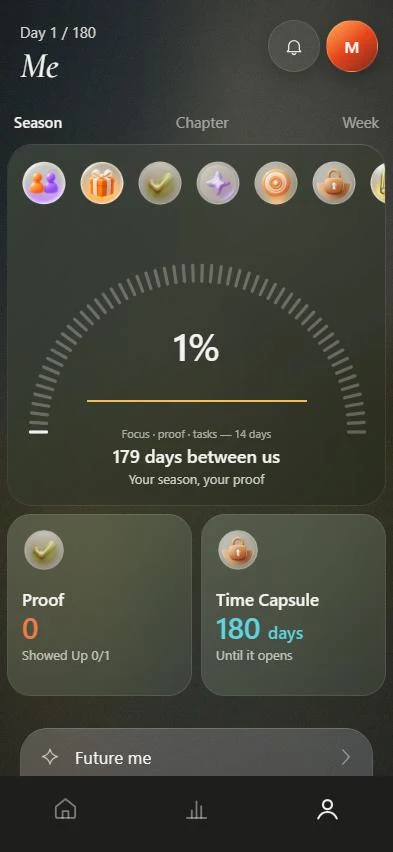
Open the Me tab and tap My Proof. The library shows your total, a filter by goal category and this week's proof. Categories are Money, Business, Body, Skills, Mind, Relationships, Lifestyle and Career. Tap an entry to open the action behind it.
When you finish an action M6 plays a short +1 Proof moment that says "You did what you said you'd do."
What does the library screen contain?
At the top is your total. Below it you can filter by goal category, view the last 7 days or the whole season, and see what landed this week. Every entry shows the type, which is action, focus session, milestone or measurement, and tapping it opens the action behind it.
A new library is empty, and it says so honestly: "Your first proof is one action away." Filter by a category with nothing in it and you get a separate message with a button to show everything again. The milestone moment in the library is a gentle prompt to show what you have proved, with no pressure to post.
What is "Showed Up"?
Showed Up counts the days on which you finished at least one thing, out of the days that have passed so far. A day-complete screen reads, for example, "Showed Up 12/20 days". The count uses days elapsed instead of 180, so the first week does not look like a failure.
Can I share my progress?
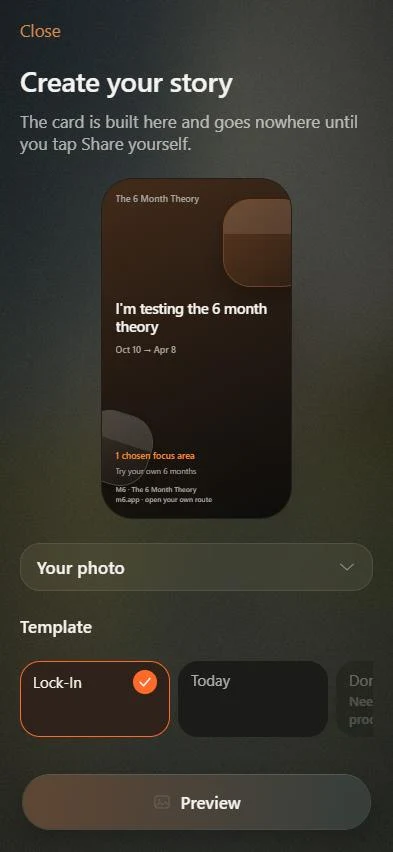
M6 can build a story card in 9:16 or 1:1 from templates such as Lock-In, Today, Done for today, A full week, Day 30, Halfway, Comeback and Chapter done. The card is built on your phone and goes nowhere until you tap Share.
Goal text is off by default, and you can switch numbers off so the card shows only the day. You can add a photo of your own.
Why does looking at evidence help?
Psychologists use the term self-efficacy for a person's belief that they can act in the ways needed to reach a goal. Albert Bandura proposed it in 1977, and he described mastery experiences, meaning personal experiences of success, as the most effective way to build it (Wikipedia: Self-efficacy).
A proof library is a way to keep those experiences within reach. On the day you feel you have done nothing, you can open the list and read back what you did. M6 does not claim this will change your results. It gives you a record to check your own memory against.
How is this different from a spreadsheet or a journal?
A spreadsheet needs you to enter data after the work. A journal asks for prose. Proof in M6 is created at the moment you tick the action, so it costs no extra effort, and it is tied to a chapter, a category and a milestone, so you can filter the way you think about the goal.
The trade-off is detail. Proof records that something was done and when. If you want to describe how it felt, use the private note on the action or the day-closing question.
Why a library instead of a streak?
A streak breaks on one bad day. A library only grows. When you return after a gap the proof you earned is still there, and that is the point of the screen on a hard day.
What controls do I get over a story card?
Three formats are available: Story 9:16, Square 1:1 and Portrait 4:5. You choose what to show, such as the day, proof, focus, goals, a before and after comparison or your partner. Amounts, task names and body metrics are hidden by default, and the switch clears them across the whole card and not only from the headline.
Styles include Paper and Obsidian for everyone. Lime, violet and photo blur belong to Pro, and on the free plan the M6 mark stays on the card. Some templates appear only when they make sense: Day 30 needs day 30, Comeback is for returning after a break, Partner needs an active partner. Nothing is published on its own. You preview, then you tap Share.
What are the limits of proof?
Proof is self-reported. M6 does not verify that you actually ran the 5 km or sent the offer, and it is not meant to. Nobody else audits it, so the value is in your own honesty. A measurement is also something you type in, and the app never guesses a number for you.
It also only covers what you do inside the plan. Work you did that was not on your list does not appear unless you add it as your own action.
What do the weekly numbers show?
The weekly review lists what you planned, what you did, Showed Up out of seven days and the time you were locked in. The rhythm screen also shows proof by day of the week and a consistency value. They are a mirror, and M6 says on milestone screens that nothing there calls you failed: it shows what actually happened.
Frequently asked questions
Can my partner see my proof?
Only the proof count, and only if you open it. By default a partner sees whether you showed up today and your day number.
Is my proof stored on a server?
Proof stays on your device. If you invite a partner and open the proof count, that number is shared with them.
Can I export my data?
Yes. In Me, Settings, Data, Export shows everything M6 keeps about you on the device, and you can copy it.
What does Showed Up mean?
It counts the days on which you finished at least one thing, out of the days that have passed so far, for example 12 out of 20.
Can I hide my goals on a story card?
Goal text is off by default, and amounts, task names and body metrics are hidden unless you switch them on. You preview the card first and nothing is posted until you tap Share.
Keep exploring
 PartnerInvite one person. You choose what they see. Reactions only, no chat.Focus timerPick a block, stay on one action, keep the minutes.Privacy PolicyNo account. Data on your device. Server only for partner and notifications.SupportFAQ and how to reach support.