A time capsule that stays sealed until day 180
M6 lets you leave a message for the person who finishes the route. You write it on day one, or record it, and it stays sealed until day 180. You can add lines to the capsule, but the original cannot be opened early, not even by asking. The capsule never leaves your device.
Coming soon to iPhone
How does the capsule work?
On day one the app asks you to leave something for day 180 and offers two options: record a message or write it instead. You can also do it later from Me.
- Open Me and tap Time Capsule.
- Write to the person who finishes this route, or record a message.
- Tap Seal the capsule. The screen shows the date it opens.
- Add more lines whenever you want. The first message stays sealed.
- On day 180 you get a notification and open it as part of the reveal.
Why seal it?
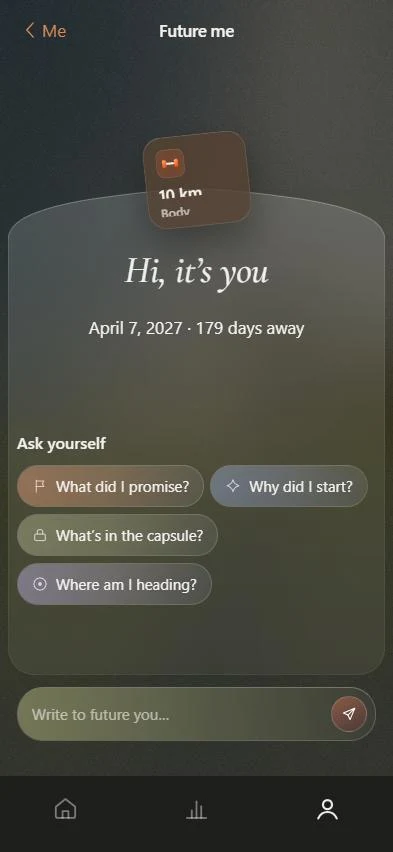
A sealed message is a promise you cannot revise in a bad week. The app says it plainly: "Sealed on purpose. It opens on day 180, not earlier, not by asking." The same screen shows the number of days left.
What is "Why I started"?
This screen keeps your day-one answer to "Why now?" exactly as written. Later you can answer "Still true?" with Yes, or write what changed. The first answer stays, and new versions are added under it, so you can read how your reason moved.
What is the day 180 reward?
You name a reward, add a note on why you chose it and attach a photo if you like. The app is direct about it: M6 does not buy or give the reward, you do. Reward types are a trip, something you want, an experience, something personal or your own.
What happens on day 180?
A notification reads "Your Day 180 time capsule is ready." and the day-180 screen offers an "Open the time capsule" button. It shows your message from day one, then what actually happened, with each target set against its actual result.
If you recorded a message, the screen points you to Me, Time Capsule to open it. If you left no capsule, the app says so, "You didn't leave a capsule", and shows the record in its place. Either way you finish with a look at what changed, not with a verdict.
What can I add while it is sealed?
You can add lines at any point, and the original stays sealed. The rule is written on the screen: you can add to the capsule, but you cannot open the original until day 180. That helps on a hard day in month three. You cannot reread what you wrote, but you can add one more sentence for the person who finishes.
Who can see my capsule?
Nobody. The capsule, notes, income values and voice messages have no visibility switch at all, so they cannot be shared with a partner even on purpose. A recorded capsule message is stored on your device.
What reward types can I choose?
The reward screen offers five kinds: a trip, something I want, an experience, something personal, or your own. You name it, add a note on why you chose it and attach a photo if you want. A photo of the thing you are saving for is a stronger reminder than a line of text.
The reward can be changed or removed later. Because M6 does not buy it or give it to you, the commitment is between you and day 180. If photo access is off in iOS Settings, the title and note still work.
What should I put in the capsule?
Write what you will want to hear on day 180. A few ideas from the letter-writing guide:
- Where you are today and what an ordinary day feels like.
- The change you want and the reason it matters now.
- Three questions to answer on day 180 with facts.
- One line of advice from today's you to the person who finished.
What are the limits?
The seal is a rule inside the app, and the capsule lives on your device. If you use Delete account and data in Settings, your season, proof and capsule are removed from the phone, with no backup and no undo. If you want to keep the letter, copy the text somewhere safe first. Settings also has an export of everything M6 keeps on the device.
A written message seals exactly the same way as a recorded one.
How is it different from a letter in a drawer?
A paper letter can be opened early and nobody will know. The capsule enforces the wait, and it is tied to the route: the day count is on the screen, the notification arrives on day 180 and the reveal shows the capsule next to your results. The cost is that it lives in one app on one device, so a drawer will outlast it. If the contents matter a lot, write a paper copy too.
Frequently asked questions
Can I open the capsule early?
No. The original message opens on day 180. You can add lines to it before then.
What if I skip the capsule on day one?
You can create it later in Me, Time Capsule. If you never leave one, the day 180 screen shows your record instead.
Does the capsule survive Season 2?
Yes. Your proof, measurements, targets and time capsule carry over to the next season.
Where can I read more about letters to yourself?
See the guide on writing a letter to your future self.
Can I record a voice or video message?
Recording belongs to the native iPhone build. A written message seals the same way and opens on day 180.
What happens to the capsule if I delete my data?
Delete account and data in Settings removes the season, proof and capsule from the device, with no undo. Copy the text somewhere safe first if it matters to you.